Gradient
rich_gradient.Gradient wraps any Rich renderable—text, panels, tables,
Markdown, even nested layouts—and paints a gradient across the composed output.
It works with foreground and background colors, respects alignment, and can
highlight words or regex matches along the way. For Rich renderables you create
often, see the convenience wrappers in Convenience Renderables.
Quick example
from rich.console import Console
from rich.markdown import Markdown
from rich_gradient import Gradient

console = Console()
markdown = Markdown(
    """
## Gradient panels

- Wrap any renderable: tables, markdown, syntax.
- Highlight sections with `highlight_words` or regex.
- Combine with Rich's layout primitives.
""".strip()
)
console.print(
    Gradient(
        markdown,
        colors=["#38bdf8", "#a855f7", "#f97316"],
        bg_colors=["#0f172a", "#2c1067"],
        justify="center",
    )
)

The full example lives in examples/gradient_showcase.py.
Working with different renderables
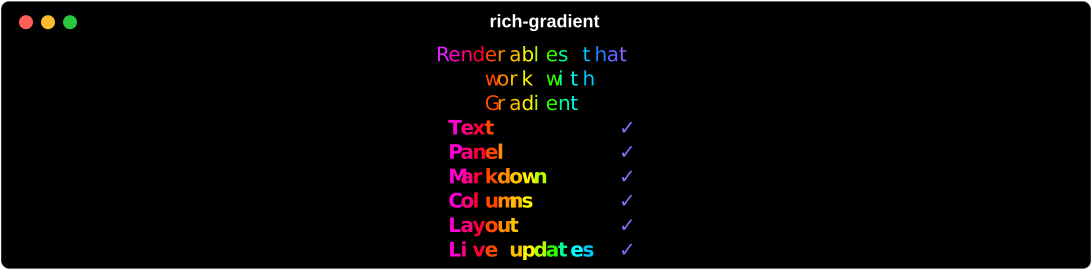
Gradient accepts a single renderable or an iterable. Each renderable is measured and interpolated to share the gradient stops, so you can layer panels, tables, and custom objects together.
from rich.table import Table as RichTable
from rich_gradient import Gradient

table = RichTable(title="Renderables that work with Gradient", show_header=False)
table.add_column("Renderable", style="bold")
table.add_column("Supported", justify="center")
for item in ("Text", "Panel", "Markdown", "Columns", "Layout", "Live updates"):
    table.add_row(item, "[bold green]✓[/]")

Gradient(table, rainbow=True, repeat_scale=1.8)
Key options:
colors/bg_colors: list of color stops (same rules asText).rainbowandhues: auto-generate palettes.justify/vertical_justify: align the renderable inside the gradient frame.repeat_scale: stretch or compress the gradient repeats.highlight_words/highlight_regex: apply extra styles after the gradient pass.
Rendering performance
Gradient renders by converting Rich output into terminal-cell clusters and then
applying foreground and background styles to each cluster. To avoid rebuilding
the same interpolated Style objects for every character, the renderer keeps an
internal cached ramp for the active color stops, render span, repeat scale, and
gamma setting.
That cache is rebuilt automatically when foreground or background color stops
change, or when Rich renders at a different span. The public API does not expose
the ramp directly; use colors, bg_colors, repeat_scale, and phase as
normal. The optimization is most useful for long renderables and animated frames
where many clusters reuse the same terminal-cell positions.
Benchmark coverage lives in tests/benchmark_perf.py and includes static
gradient rendering, animated frame rendering, long text, and panel rendering.
Highlight configuration classes
For larger configurations, you can build highlight rules explicitly with the
dataclasses in rich_gradient._highlight and pass them into Gradient.
import re

from rich.style import Style
from rich_gradient import Gradient
from rich_gradient._highlight import HighlightRegex, HighlightWords

rules_words = [
    HighlightWords(words=("error", "warning"), style=Style.parse("bold red")),
    HighlightWords(words=("hint",), style=Style.parse("italic cyan"), case_sensitive=False),
]

rules_regex = [
    HighlightRegex(pattern=re.compile(r"\b\d+\b"), style=Style.parse("bold yellow")),
]

Gradient(
    "error 42: warning: retry",
    colors=["#38bdf8", "#a855f7", "#f97316"],
    highlight_words=rules_words,
    highlight_regex=rules_regex,
)
You can still pass legacy mappings/tuples; HighlightWords.from_config and
HighlightRegex.from_config normalize both styles.
Animation
Gradients can be animated by advancing the .phase attribute yourself or by using AnimatedGradient. Animated variants manage a rich.live.Live console and update the gradient smoothly without manual bookkeeping.