Inspect
rich_gradient.inspect is a gradient version of rich.inspect. It shows the same report on any Python object, but frames it in a gradient panel.
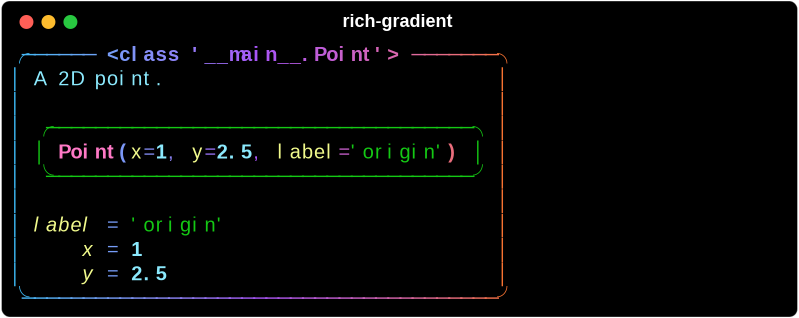
Basic usage
from dataclasses import dataclass

from rich_gradient import inspect


@dataclass
class Point:
    """A 2D point."""

    x: int = 1
    y: float = 2.5
    label: str = "origin"


inspect(Point(), colors=["#38bdf8", "#a855f7", "#f97316"])
inspect() takes the same options as rich.inspect (methods, help, private, dunder, all, docs, value, sort, title) plus the usual gradient options (colors, bg_colors, rainbow, hues):
Staying readable
Only the frame, the title, and text Rich leaves uncolored (such as = signs and docstrings) take the gradient. Attribute names, values, and signatures keep the colors Rich gives them, so the report is as easy to scan as rich.inspect's. To paint everything with the gradient instead, pass keep_value_colors=False.
The Inspect renderable
inspect() prints straight away. To place the report inside other renderables, or print it later, build an Inspect instead. It is a gradient Panel, so it also takes panel options such as box, border_style, title_style, expand, and justify:
from rich.box import HEAVY
from rich.console import Console
from rich_gradient import Inspect

Console().print(Inspect([1, 2, 3], colors=["#22c55e", "#a3e635"], box=HEAVY))
For the full signature see the Inspect reference.